Stay Focused: Site/App Blocker
- 4.4
- Rating
- 5.00M
- Installs
- Free
- Price
 Analysis by App-foxy
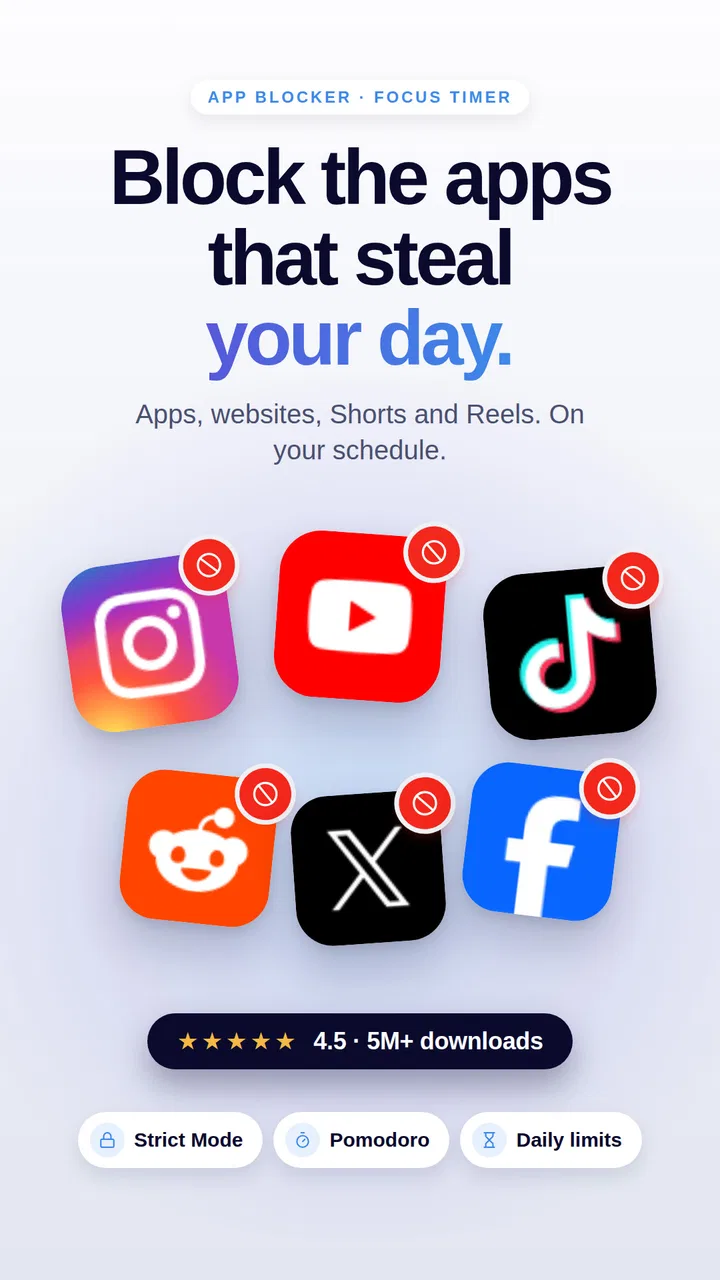
I tried Stay Focused: Site/App Blocker as a productivity companion rather than treating it like a simple timer. Its main purpose is to help me interrupt the reflex of opening distracting apps, websites, short videos, and reels when I should be working, studying, resting, or sleeping. That sounds straightforward, but the useful part is how it turns an intention such as “I will only check this for a minute” into a rule I have to actively reconsider.
The app comes from INNOXAPPS LLP and sits in the productivity category. It is free to start, rated for Everyone, and has reached over five million installs. Its average rating is 4.4 from around 169 thousand ratings, which suggests that the basic idea works for a large audience, although a high rating should not be mistaken for a guarantee that every blocking setup will suit every phone or routine.
How Stay Focused feels in everyday use
My first impression was that the app is aimed at people who already know where their time disappears. It is not trying to teach a complete productivity system. Instead, it focuses on the moment before distraction: the automatic tap on a social app, the quick visit to a video site, or the habit of opening a feed whenever a task becomes slightly difficult.
You May Also Like

 Blood Strike: 2.5 Anniversary
Blood Strike’s Loadouts Turn Every Drop Into a Tactical Gamble
A close look at Blood Strike’s custom loadouts: how fast access to signature weapons reshapes its battle royale rhythm, rewards preparation, and narrows the gap between fights.

 Pandora - Music & Podcasts
Pandora’s Music Is Easy to Start, but Harder to Recover
Pandora’s strength is its low-effort path from a seed to a station. Its weak spot is how much confidence it asks you to place in connection, setup, and quiet recovery.

 8 Ball Pool
 Is Built on Rivalries, Rematches, and Routine
A close look at the rivalries, rematches, shared routines, and unanswered safety questions that turn a quick pool match into a persistent mobile community.

 Samsung Music
’s Quiet Strength Is Playing What You Already Own
Its reach comes less from spectacle than from dependable access to a personal library. That simplicity is both the app’s strongest retention engine and its ceiling.

 AccuWeather: Weather Radar
AccuWeather Review: A Quick, Clear Forecast for Everyday Decisions
For everyday plans, the best forecast is the one you can understand quickly. AccuWeather makes rain timing, radar, and local conditions easy to act on, with a few trade-offs.

 Hill Climb Racing
Why Hill Climb Racing Still Turns Crashes Into One More Run
A tiny car, a bumpy hill and one more upgrade: Hill Climb Racing keeps resurfacing because its simple chaos makes every near-miss feel personal.
More From Our News Desk



That narrow purpose is a strength. I do not have to rebuild my calendar, notes, task list, or work method around it. I can keep using the tools I already like and use this app as a layer of friction around the ones that repeatedly pull me away. The store summary also points to study timing, app blocking, shorts blocking, and reels blocking, so the experience is clearly built around controlling attention rather than recording productivity after the fact.
The most important decision is not installing it; it is deciding what I genuinely need blocked. If I restrict everything that feels entertaining, I create an arrangement that is difficult to live with and tempting to disable. If I target the few apps or kinds of content that cause the most repeated checking, the system becomes much more practical. I found that the app makes more sense when used as a deliberate boundary instead of a punishment.
What speed should you expect?
Stay Focused is not the sort of app where speed means fast graphics or a powerful interface. Its perceived performance comes from how quickly I can define a rule, start a focused period, and understand what is currently restricted. For this kind of tool, a clean response matters because a delay during setup can make me abandon the plan before it begins.
In normal use, I would expect the visible controls to feel lightweight because the core job is managing focus choices rather than processing large files or displaying complex media. That does not mean every action will feel identical on every Android or iOS device. The phone’s operating system, background behavior, and the number of restrictions I configure can all affect how seamless the experience feels.
A useful habit is to prepare a session before I need it. For example, I can set up a study block while I am still calm, rather than trying to decide which apps to restrict after I have already opened a distracting feed. This is more than a speed tip: it removes decision-making at the exact point when my self-control is weakest.
The app’s focus timer is particularly relevant for people who dislike open-ended rules. A fixed period gives me a clear finish line, while a permanent block can feel excessive for ordinary days. I prefer starting with a manageable session and extending the routine only after I know that the selected restrictions do not interfere with essential communication or work.
What happens during heavy-use moments?
The demanding moments are not necessarily technical. They are the times when I am switching between a work app, a browser, messages, and entertainment several times in a short period. That is when a blocker earns its place, because the problem is not one long session of distraction; it is a series of tiny interruptions that break concentration.
Consider a realistic evening study session. I have a document open, a question I need to research, and a phone nearby. Without a boundary, a legitimate search can turn into short videos, then a social feed, then another unrelated check. With Stay Focused configured around those problem apps and sites, I can leave the tools required for the assignment available while putting the tempting detours behind a rule. The trade-off is that I need to think carefully about exceptions before starting.
This is where blocking short-form content can be more useful than simply blocking an entire social platform. Sometimes I need a messaging function or a particular account for practical reasons, but I do not need an endless stream of reels or shorts. A targeted approach reduces the chance that the app becomes so restrictive that I immediately switch it off.
Heavy use can also expose a weakness in any digital self-control tool: the user remains part of the system. If I repeatedly override, pause, or remove restrictions whenever they become inconvenient, the app cannot create discipline on my behalf. Its real value is in adding a deliberate pause between an impulse and an action. For me, that pause is often enough to ask whether I am choosing entertainment or merely avoiding a difficult task.
Another useful scenario is bedtime. I can use a focused period to reduce the habit of checking feeds after getting into bed, while leaving essential functions available. I would not treat the app as a medical sleep solution, but it can support a simple wind-down routine by making the most tempting distractions less immediate.
Reliability depends on the rule, not just the app
A blocker needs to be dependable enough that I trust the boundary. If I expect it to stop a distraction and it does not, the whole routine loses credibility. At the same time, reliability is not only about whether a restriction appears. It also includes whether I can recover sensibly when I block something by mistake or discover that a work task needs access.
I recommend testing a small setup first. Choose one or two major distractions and run a short focus period before creating a strict schedule. This reveals whether the arrangement fits the way I actually use the phone. It also avoids the frustrating situation where I block a browser, communication app, or service needed for a normal task and then have to dismantle the entire plan.
Recovery is especially important for shared devices, changing schedules, and people whose work is unpredictable. A student may have a fixed revision period, while a freelancer may need to respond to clients at irregular times. The first person can use a repeatable routine more confidently; the second may benefit from shorter, manually started sessions. The app is a better match when I am willing to review my rules instead of expecting one setup to remain perfect forever.
I also see value in treating a failed session as information rather than as proof that the app is useless. If I keep needing access to one restricted app, perhaps that app should not be blocked completely. If I always abandon a session after a certain length, the period may be too ambitious. The practical lesson is to adjust the boundary around my real behavior, not an idealized version of myself.
The developer, INNOXAPPS LLP, has kept the concept recognizable: this is a focused utility, not a general digital-wellbeing dashboard. That makes it easier to understand, but it also means the experience depends heavily on how thoughtfully I configure and maintain it.
Device limits and the cost of strict control
Stay Focused is available as a free app, with in-app purchases ranging from $0.49 to $99.99 per item. That matters because the free starting point makes experimentation easy, while the presence of optional purchases means I should inspect the exact upgrade choices before assuming every control is included without payment. I would begin with the free experience and decide whether it solves my problem before spending anything.
The age rating is Everyone, which fits a utility intended for broad use. Still, suitability is personal. Parents may consider it for a child’s study routine, but I would treat that as a conversation tool rather than a substitute for agreed household rules. A young user who sees blocking as an imposed obstacle may simply look for ways around it, whereas a user who helps choose the limits is more likely to accept them.
Device behavior is another practical consideration. Restrictions that interact with apps, websites, or system-level behavior can feel different across operating systems and phone models. Battery usage, background activity, and system permissions are areas where I would avoid making universal promises. If my phone is older, heavily customized, or already struggling with background tasks, I would test the app gradually instead of activating an elaborate schedule immediately.
That gradual approach is also kinder to the device. I would begin with a limited number of targets, observe how the phone behaves during an ordinary day, and then add more only if the first setup is stable and useful. There is no benefit in creating a complicated blocking network that I cannot understand or maintain.
People who need uninterrupted access to many services may find a strict blocker inconvenient. A journalist checking multiple sources, a support worker responding to messages, or a parent waiting for urgent contact may need selective control rather than a broad lockout. In those cases, the usual alternative of built-in screen-time controls or simple notification management may be more appropriate, especially if the main problem is alerts rather than compulsive browsing.
How it compares with ordinary alternatives
Most phones already offer some form of screen-time reporting, app limits, focus modes, or notification controls. Those built-in options are often the better first step for someone who only wants to see usage patterns or silence interruptions. They are usually integrated into the operating system and can cover basic scheduling without adding another productivity app.
Stay Focused makes more sense when awareness alone has not changed my behavior. A usage report can tell me that I spent too long on a feed, but it does not necessarily interrupt the next automatic opening. This app’s appeal is the stronger emphasis on actively restricting distracting destinations and using a focus timer to create a defined period of control.
It also differs from a task manager. A task manager helps me decide what to do; Stay Focused helps reduce the chance that I abandon that task for a habitual distraction. Using both can work well: I can choose one clearly defined task, start a focused period, and leave the task manager and necessary reference tools accessible while restricting the entertainment loop.
Compared with a simple manual promise, the app adds friction at the right moment. Compared with a completely locked-down device, it can be more flexible if I choose narrow targets. The central trade-off is control versus convenience. The more aggressive the restrictions, the more carefully I need to plan exceptions and recovery.
Who will benefit most from it?
I think Stay Focused is strongest for people who lose time through repeated checking rather than one planned leisure session. Students, remote workers, people studying for exams, and anyone trying to reduce short-video habits can find a clear use for it. It is also suitable for someone who has already tried relying on willpower and wants a visible boundary without changing their entire phone.
It is less suitable for someone who wants detailed project planning, collaborative task management, or a complete habit-tracking system. It also may not be the right choice for users who need constant access to a wide range of apps and websites. In those situations, a lighter focus mode, notification settings, or a calendar-based routine may create less friction.
The strongest results come from pairing the app with a specific intention. “Be more productive” is too vague. “Write the first section of my report without opening short videos” gives the blocking session a job. That wording also helps me decide which access is genuinely necessary and which access is merely tempting.
One non-obvious advantage is that the app can help diagnose the shape of a distraction. If blocking an entire service feels impossible, I can notice whether the real trigger is its reels, shorts, website, or repeated app opening. That observation lets me build a narrower rule and preserve useful parts of the service. The blocker becomes a way to learn about my habits, not only a wall placed in front of them.
My performance verdict after weighing the trade-offs
Stay Focused is a practical productivity app with a clear job: make distracting apps, sites, and short-form content less available during periods when I want to concentrate. Its perceived speed should be judged by how quickly it lets me establish a useful boundary, while its stability and resource demands will naturally depend on the device, operating system, and complexity of the setup. I would test it in a small, realistic routine rather than activating every possible restriction at once.
The free entry point is helpful, and the broad audience reflected by its Everyone rating and large install base makes it approachable. The 4.4 average from around 169 thousand ratings is encouraging, but my recommendation is still conditional: the app works best when I select precise targets, plan essential exceptions, and use the timer as support rather than as a substitute for a workable schedule.
My honest view is that this is worth trying if your main problem is automatic checking of feeds, short videos, reels, or distracting websites. It is not a complete answer to procrastination, and it will not make a badly planned day productive by itself. But when I combine a clear task with a carefully chosen block, it creates the small interruption that a normal screen-time report often fails to provide.
My recommendation: start with one short focus session, block only the distractions that repeatedly derail you, and judge the app by whether you finish more of the task you intended to do. That approach keeps recovery simple, reduces pressure on the device, and gives Stay Focused a fair chance to prove whether its stricter form of self-control fits your routine.
FAQs for Stay Focused: Site/App Blocker
01What is Stay Focused: Site/App Blocker used for?
Stay Focused: Site/App Blocker is designed to help you reduce distractions from your phone. After installing it, you can limit access to selected apps and websites, set daily usage allowances, create blocking schedules, and monitor your habits. It can be useful for studying, working, sleeping, or simply spending less time on social media and other frequently opened services.
02Can I block both mobile apps and websites with Stay Focused?
Yes, the app supports blocking or restricting access to individual mobile applications and websites, depending on the device and the permissions you allow. You can usually create separate rules for different services, such as social networks, games, video platforms, or news sites. Before downloading, remember that website filtering may work differently on Android and iOS.
03Does Stay Focused: Site/App Blocker offer schedules and daily limits?
Stay Focused includes tools for setting time limits and planned blocking periods. For example, you can allow a social media app for a specific number of minutes per day or block distracting websites during work and study hours. These controls make the app more practical than simply blocking everything permanently, especially when you need occasional access.
04Can the blocking restrictions be bypassed or disabled easily?
The app is intended to make distractions harder to access, but no blocking tool can guarantee complete protection against every workaround. Depending on the settings, you may be able to add strict modes, lock configurations, or use a passcode to prevent quick changes. However, the effectiveness depends on your device permissions, operating-system limitations, and personal commitment.
05What permissions does Stay Focused require, and is it safe to use?
To identify usage and restrict selected apps or websites, Stay Focused may request permissions such as usage access, accessibility access, notifications, or VPN-related filtering, depending on the platform and enabled features. These permissions are important for the blocker to function, so review the privacy policy and store listing before installation. Only grant access you understand and consider necessary.
Pros
- Blocks distracting apps and websites effectively.
- Flexible schedules let you customize focus sessions.
- Usage statistics help identify time-wasting habits.
- Strict mode can prevent easy changes during a session.
- Supports productivity goals with reminders and limits.
Cons
- Some advanced blocking tools require a premium subscription.
- Incorrect settings may block apps needed for urgent tasks.
- Strict restrictions can be difficult to disable when necessary.
- Website blocking may vary between browsers and devices.
- Frequent notifications can feel intrusive for some users.

Stay Focused: Site/App Blocker
Gallery